Welcome to the Learning Center
Access step-by-step guides to set up your store, manage your store operations, and make the most of your DoorDash partnership.

Merchant onboarding guide

Learn from experts with webinars
Browse our library of existing webinars and sign up for upcoming digital events.
Browse webinarsGet started

How Do I Sign My Store Up for DoorDash?
Signing up for DoorDash typically takes 1-5 days from application to going live. You'll create an account, choose how you receive orders, set up your menu and store details, and activate your tablet or POS before accepting your first order.
Apr 9, 20268 min read
How to update account settings in the Merchant Portal
Your account settings in the Merchant Portal allow managers and admins to update store-level information such as your store name, address, contact details, pickup instructions, and email preferences. You can also review commission rates, tax rates, and payout settings in one place. Viewing and editing permissions depend on a user’s defined role in the Merchant Portal.
Sep 9, 20245 min read
How to Add Photos to Your DoorDash Menu
Learn how to add your logo, DoorDash photos, and other ways to show photos of food and increase sales.
Dec 11, 202510 min read
How Do I Add and Manage Menu Items in the DoorDash Merchant Portal?
You can add, edit, organize, and manage menu items using Menu Manager in the Merchant Portal. This article walks through how to add new items, update descriptions, organize categories, manage item availability, and edit menus across multiple locations.
Apr 13, 20269 min read
How to Operate and Manage Your Store on DoorDash
Learn about DoorDash's tech tools, including the Merchant Portal, DoorDash Tablet, Business Manager app, and POS Integrations.
Nov 12, 20257 min read
How Do I Get My Store Ready to Go Live on DoorDash?
To go live successfully on DoorDash, make sure your store details, menu, hours, and tablet are fully set up in the Merchant Portal. Completing these essentials helps customers find your store, understand your menu, and place orders without delays.
Mar 20, 20264 min read
Understanding Your Merchant Optimization Score
Your optimization score shows how well your store is set up to reach its sales potential on DoorDash. If your business has access, you'll see it in the Merchant Portal. Your score updates as you complete recommended actions that help improve performance, visibility, and overall readiness to grow on DoorDash.
Sep 3, 20245 min read


Operate and manage your store on DoorDash
A how-to on DoorDash's tech tools, including the Merchant Portal, DoorDash Tablet, Business Manager app, and more.
View tools
New features
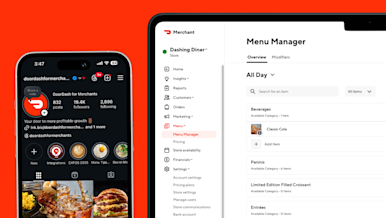
Connecting Your Instagram Account to the DoorDash Merchant Portal
Merchants can connect their Instagram account to the DoorDash Merchant Portal to add Instagram photos to their menu. This helps fill photo gaps and improve how your store appears to customers — without requiring manual photo uploads.
Dec 11, 20258 min read
How to Manage DoorDash Customer Reviews in the Merchant Portal
Customer ratings show how customers feel about their experience with your business on DoorDash. Customers choose one of three options — Loved, Liked, or Didn’t Like — and can add tags to explain what went well or what could be improved. These ratings help you understand customer feedback and identify ways to improve future orders.
Jun 2, 20245 min read
How Do I Set Item-Level Prep Times?
Item-level prep times let you tell DoorDash how long individual menu items usually take to prepare. DoorDash uses these times to determine when Dashers should arrive for pickup. Keeping them accurate helps reduce early or late arrivals, minimize wait times, and keep deliveries running smoothly.
Sep 12, 20254 min read
How to Create Smart Campaigns in the Merchant Portal
Learn how to create Smart Campaigns in Merchant Portal, manage BOGO rules, migrate existing campaigns, and view Campaign Reporting performance.
Mar 27, 20264 min read
How Do I Use the Item Description Generator to Update Menu Items?
You can use the item description generator in the Merchant Portal to automatically create or rewrite menu item descriptions using AI. The tool uses details like item names, photos, and modifiers, and lets you review, edit, or regenerate descriptions before saving them.
Apr 29, 20255 min read


Manage orders from anywhere
Learn how Live Order Management (LOM) enables business owners to manage orders in real-time with the DoorDash Business Manager app.
Learn morePOS Integrations
How to Integrate Your POS with DoorDash
Learn how to integrate your POS system with DoorDash so you can receive all of your orders in one place, minimize cancellations, and simplify your daily operations.
Dec 11, 20255 min read
POS Integration Overview
Managing a restaurant is complex, but your technology should not be. A DoorDash pos integration creates a seamless bridge between your point of sale system and the DoorDash platform. This allows you to manage incoming orders, menu updates, and business insights all in one place.
Aug 19, 20244 min readHow to Operate and Manage Your Store on DoorDash
Learn about DoorDash's tech tools, including the Merchant Portal, DoorDash Tablet, Business Manager app, and POS Integrations.
Nov 12, 20257 min read
How to Switch Your Order Protocol on DoorDash
Your order protocol is the method for receiving your store's orders on DoorDash. You can switch order protocol at any time to best match your store's needs.
Sep 25, 20255 min read
Manage Your Square Integration with DoorDash
Your Square integration sends DoorDash delivery and pickup orders directly to your point-of-sale (POS), so you can manage menus, hours, and orders in one place. This article explains what you need to get started, how onboarding works, and where to get support for your Square integration.
Apr 14, 20256 min read
Manage Your Checkmate Integration with DoorDash
Your Checkmate integration sends DoorDash delivery and pickup orders directly to your point-of-sale (POS), so you can manage menus, hours, and orders in one place. This article explains what you need to get started, how onboarding works, and where to get support for your Checkmate integration.
Apr 13, 20268 min read
Manage Your Otter Integration with DoorDash
Your Otter integration sends DoorDash delivery and pickup orders directly to your point-of-sale (POS), so you can manage menus, hours, and orders in one place. This article explains what you need to get started, how onboarding works, and where to get support for your Otter integration.
Jun 29, 20246 min read
Manage Your Deliverect Integration with DoorDash
Your Deliverect integration sends DoorDash delivery and pickup orders directly to your point-of-sale (POS), so you can manage menus, hours, and orders in one place. This article explains what you need to get started, how onboarding works, and where to get support for your Deliverect integration.
Jun 20, 20246 min read


DoorDash Preferred Integrations Program
Learn about the DoorDash Preferred Integrations Program (DPIP), which tracks POS and middleware providers' integration health in real-time.
Learn more
DoorDash Commerce Platform

How to Grow Sales With DoorDash Commerce Platform
Discover how you can drive direct sales on your own channels using DoorDash Commerce Platform — plus, five tried-and-true ways to get started.
Sep 26, 20256 min read
How to Add a Smart "Order Now" Button to Your Website
A customizable, online ordering button that makes it easy for customers to order directly from your site.
Oct 1, 20254 min read
How to Build a Restaurant Ordering App That Drives Repeat Orders
Learn how to build a restaurant ordering app that reflects your brand, drives loyalty, and increases orders — without writing a single line of code.
Aug 6, 20257 min read
DoorDash Drive On-Demand Onboarding and FAQs
This page answers common questions about DoorDash Drive, including how to get started, understand billing, check delivery limits and get support.
Sep 30, 20246 min read


Get started with DoorDash today
Learn how partnering with DoorDash can support your business growth.
Talk to our team