
What are Marketing Credits?
As a valued merchant partner, we offer marketing credits to help you grow your business on DoorDash.
With Marketing Credits, you can:
Grow your business with co-funding
Get more value from every marketing dollar
Run marketing risk-free
There are no hidden fees or long-term commitments, and you can pause or end your campaigns at any time.
Credits are automatically applied to your eligible active campaigns before your own budget is used. Once your credits are used, standard billing applies — and you only pay when your campaign leads to an order.
Three types of Marketing Credits
Trial credits
Trial credits are one-time credits given to you, courtesy of DoorDash, to help you try marketing risk-free and grow your business.
Reward credits
Reward credits are ongoing credits earned from your own Sponsored Listing spend, giving you 5% back each month on eligible spend that can be automatically reinvested into your active Sponsored Listings.¹ ²
Note: Currently rolling out to select merchants as part of a pilot.
General credits
General credits are flexible, one-time credits provided by DoorDash for select operational needs.
How Marketing Credits work
1. View your credits
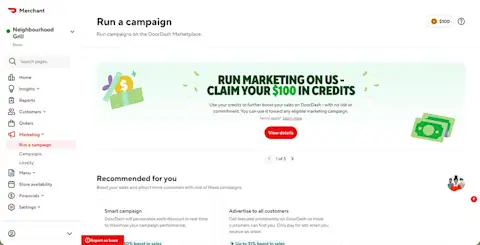
Your available credits, expiration dates, and eligible marketing campaigns are shown in your Marketing Wallet, located in the top-right corner of the Run a campaign page or the Campaigns page.
2. Apply your credits
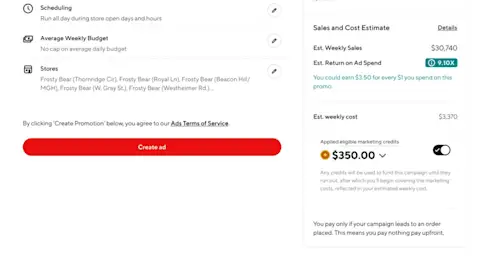
Credits are automatically applied to eligible campaigns before any billing occurs.
Credits are always applied first to your campaigns
If you have multiple campaigns, credits are distributed across them
Eligible campaigns are listed in your credit details in your Marketing Wallet
You can remove or reapply credits during campaign setup or when editing a campaign
3. Pay only after credits are used
Once your credits are used, your campaign continues under standard billing. You only pay when your campaign leads to an order.
Marketing Credits at a glance
Check your Marketing Wallet for details, including expiration dates and where credits can be used.

Log in to your Merchant Portal to check your Marketing Wallet and see whether you have available credits.
Log in to the Portal
¹ Reward credits are earned based on the merchant's eligible marketing spend, excluding applicable taxes (except in Australia), and subject to the current earning structure and eligible products. For Australia, eligible spend includes applicable taxes.
² Only merchant-funded Sponsored Listings spend qualifies for reward credits. Spend funded by DoorDash or third parties — including incentives, promotional credits, or marketing fund contributions — does not qualify.
³ Credits are automatically applied to eligible campaigns. Merchants may choose to remove or reapply credits during campaign setup or by editing campaign settings.
⁴ Reward credits expire at the end of Q1 in the calendar year following the year the credits are issued.
Terms and conditions
Credits are non-transferable, have no cash value, and cannot be redeemed for cash or any other form of compensation. Participation in the program and associated credits may be modified, suspended, or terminated at any time at DoorDash's sole discretion.